

Photo Stats
What it does
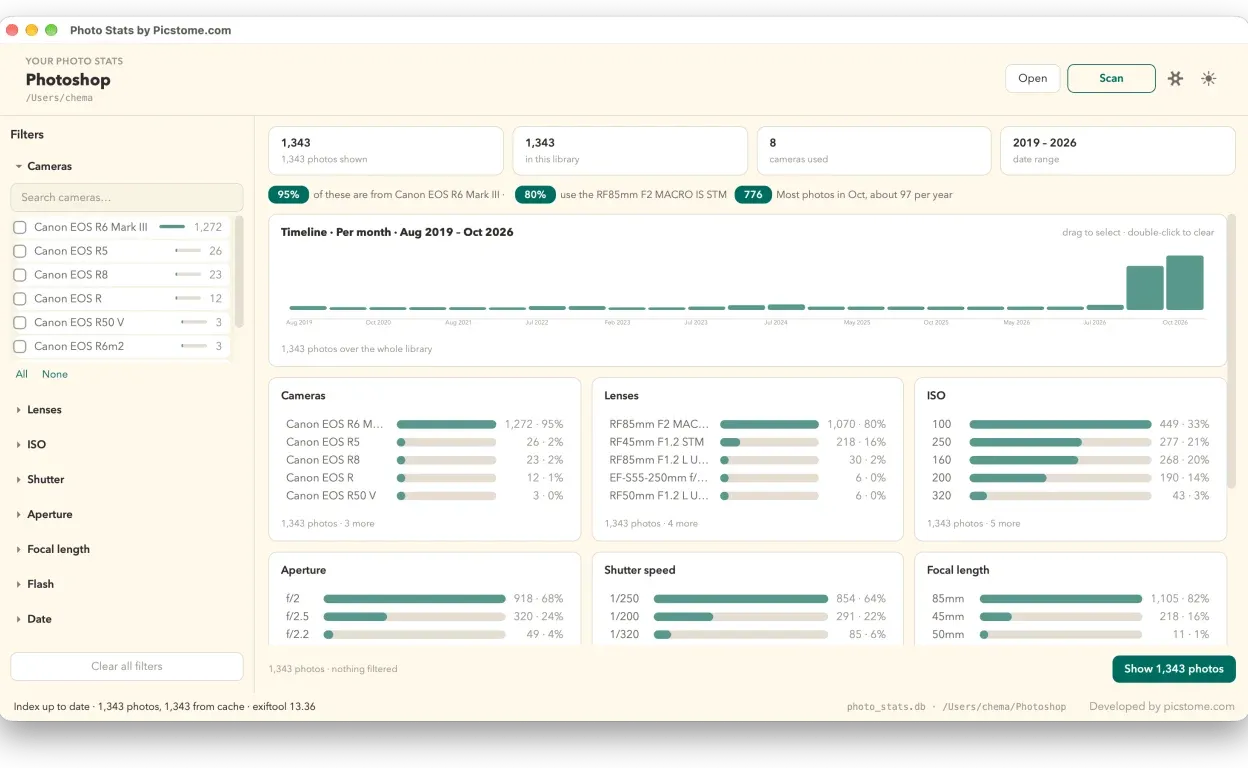
Section titled “What it does”Photo Stats opens a folder of photos, reads every file’s metadata and turns it into charts: which cameras and lenses show up most, at what ISO, aperture, shutter speed and focal length you shoot, and how all of it changes over the years.
It is not a gallery or an editor. It does not show the photos to rate them: it measures the pattern behind your work.
How to use it
Section titled “How to use it”- Open the app and choose Open to pick the photo folder.
- Press Scan. The first pass indexes the files; later passes only read what is new or changed.
- Use the filters on the left, or press a bar in a chart to narrow the rest.
Everything is computed on your computer. There is no account, nothing is uploaded and there is no cloud.
What it shows
Section titled “What it shows”- Cameras and lenses: how many photos come from each body and each lens.
- ISO, aperture, shutter speed and focal length: the settings you actually shoot at.
- Orientation: how many photos are portrait and how many are landscape.
- Timeline: how your shooting changes month by month and year by year.
- Cross-filtering: press a bar and the rest of the charts update to show only that subset. Filter by 35 mm and the ISO chart shows the ISO of your 35 mm photos.
Where the index lives
Section titled “Where the index lives”Photo Stats keeps a photo_stats.db file inside the folder you open. That file is the index; the next pass only reads what is new or modified, so it does not process thousands of photos again.
It needs exiftool to read metadata, with the same install as the Rater: brew install exiftool on macOS, or exiftool.exe on the PATH on Windows.
What it is useful for
Section titled “What it is useful for”- Deciding whether the lens you think you use is the one you actually use.
- Seeing whether new gear changed how you shoot or only the cupboard.
- Understanding your evolution without opening a spreadsheet.
Download it at picstome.com/photostats.
Related
Section titled “Related”- Picstome Rater — the other desktop app.
- Rating and flagging — the stars inside the panel.
- Favorites and the selection limit — how the client chooses.